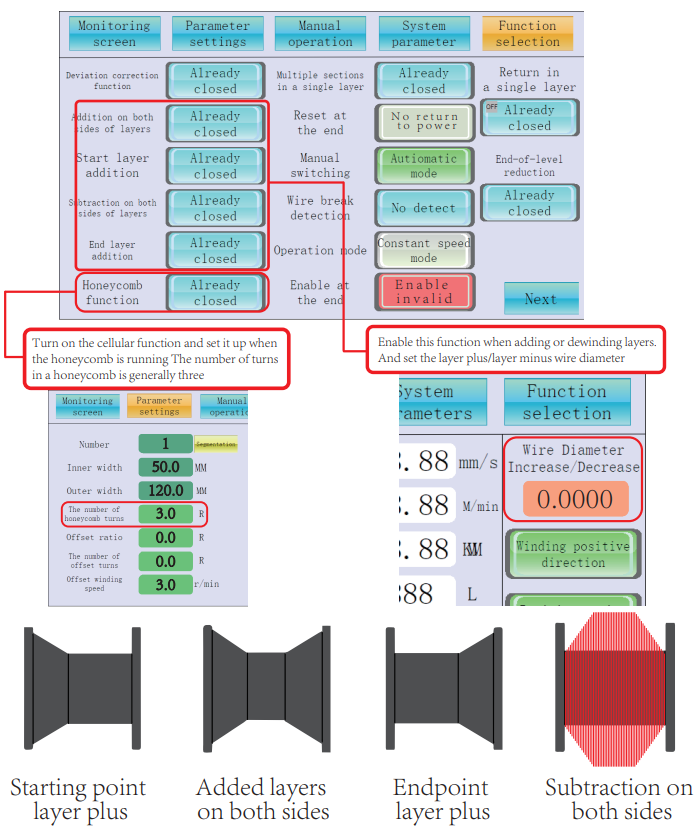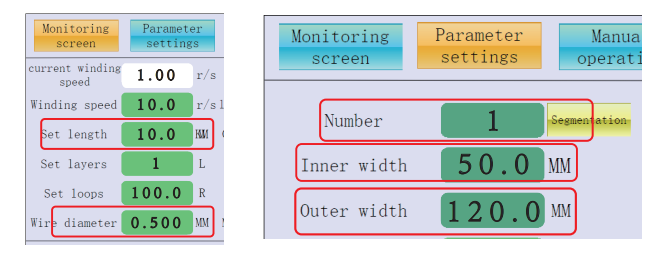
 The above picture shows the range of the spool that can be wound and the inner and outer widths of the spool
  Interface description of the monitoring screen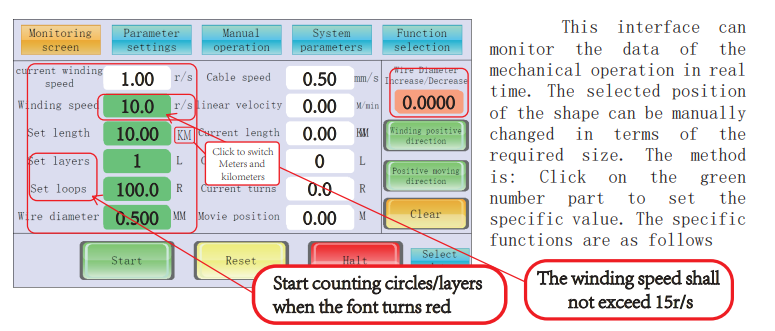
| Function button | Unit | Function Description |
| Current Rao Speed | r/s | The speed of the equipment during winding operation, the higher the number, the faster the speed |
| Winding speed | r/s | Preset the speed during winding operation. The higher the number, the faster the speed |
| Set the length | Km/M | Set the required winding length. When the set length is in red font,It is currently in meter mode |
| Set the number of layers | L | The preset number of layers in meter counting mode. Click to start counting layers when it changes to red font |
| Set the number of turns | R | The preset number of laps in the meter counting mode starts when the font turns red after clicking |
| Wire diameter | MM | Line diameter |
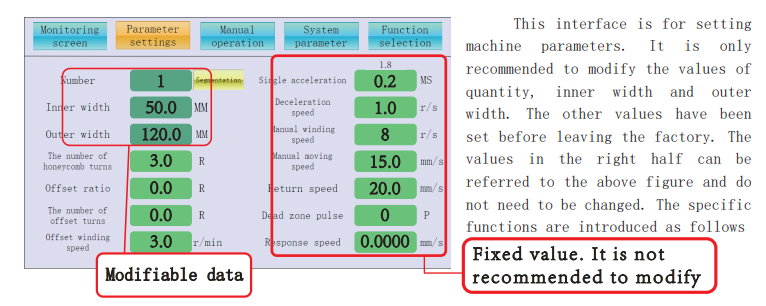
| Function button | Unit | Function Description |
| Quantity | The number of winding reels | |
| Inner width | MM | The inner width of the winding wheel (winding width) |
| Outer width | MM | The outer width of the wound wheel (this data must be precise as it is related to multiple axes.Can it precisely jump to the next reel when winding? |
| Number of cellular circles | R | The number of turns required to wind the honeycomb on the basis of the inner width of the wound wire |
| Offset ratio | % | When winding multiple axes, use the inner width of a single axis as the reference to jump to the next one When pre-winding a reel, set the offset ratio and distance to 30%. When the reel jumps to the next position, the reel will first walk to the 30% position of the reel for several turns (the number of turns can be set), and then return to the original starting point of the reel for winding. |
| Number of offset turns | R | When winding multiple axes, use the inner width of a single axis as the reference to jump to the next one The speed of pre-winding each spool. |
| Offset winding speed | r/s | When winding multiple axes, the pre-winding speed when jumping to the next axis is based on the inner width of a single axis. |
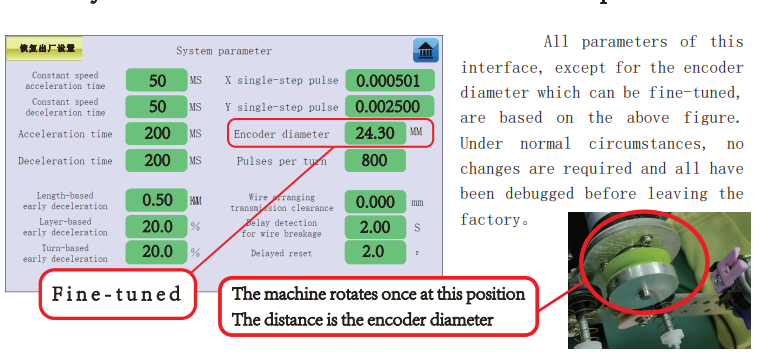
| Function button | Unit | Function Description |
| Constant speed acceleration time | MS | The time from rest to constant speed in parallel winding mode The larger the number, the longer the acceleration time |
| Constant speed deceleration time | MS | The time from constant speed to stop in parallel winding mode The larger the number, the longer the deceleration time |
| Acceleration time | MS | The time from static to high speed in cellular mode, the larger the number,The longer the acceleration time |
| Deceleration time | MS | The time from static to stop in cellular mode, the larger the number,The longer the deceleration time |
| Length-based early deceleration | M / K M | Start decelerating from the remaining length of the winding |
| X single-step pulse | Winding pulse: The system is preset to 0.000501 and no change is required | |
| Y single-step pulse | Ribbon cable pulse: The system is preset to 0.002500 and no change is required | |
| Encoder diameter | M M | The diameter of the meter measuring wheel, for identifying the accuracy of meter measurement parameters |
| One circle of pulse | The number of pulses for one full rotation of the winding is preset to 800 by the system and does not need to be changed | |
| The transmission clearance of the flat cable | The gap between the lead screw and the slider is preset to 0 and does not need to be changed | |
| Delay detection disconnection | S | The time for identifying disconnections, the larger the number, the more delayed the identification of disconnections |